Audit Summary
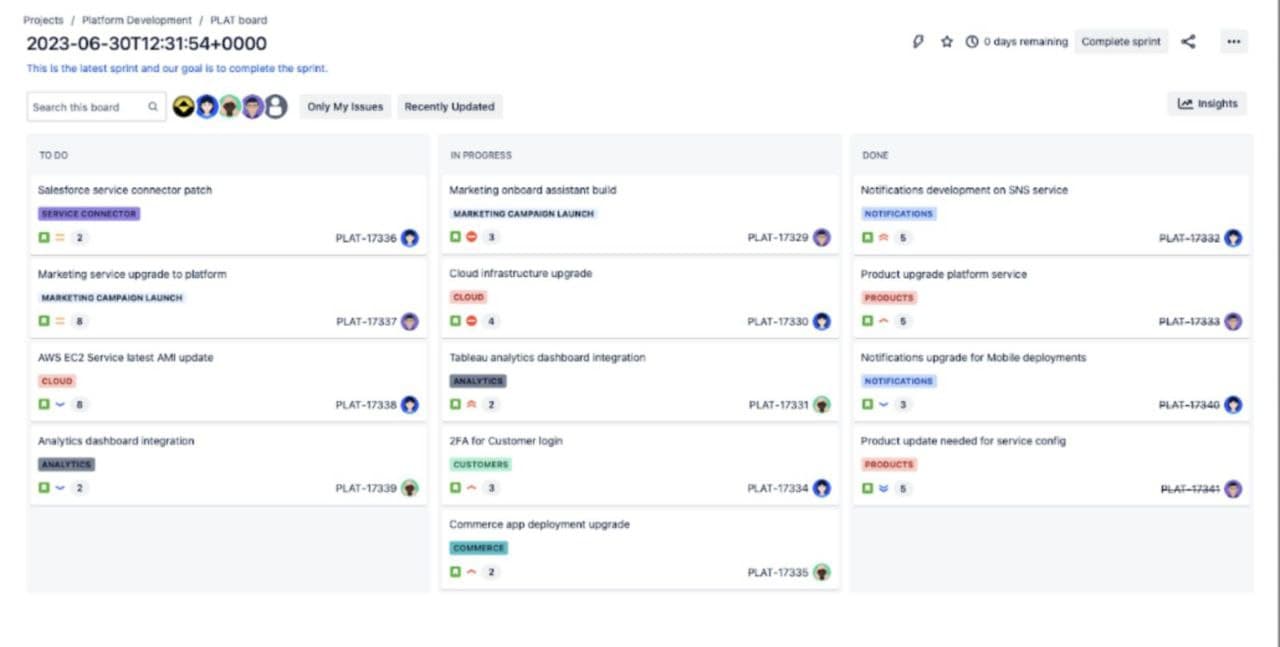
1. Overall AssessmentThis is a Kanban-style project management board for sprint planning and tracking. The interface displays a functional workflow system with clear column structure (TO DO, IN PROGRESS, DONE) and task cards containing multiple data points.
**Overall Quality: 5.5/10**
Strengths
**Clear Workflow Structure:** The three-column Kanban layout provides immediate understanding of task progression**Consistent Card Design:** All 9 task cards follow the same layout pattern, creating visual predictability**Good Information Architecture:** Breadcrumb navigation, sprint identification, and hierarchical organization are well-implemented**Visual Categorization:** Colored label badges help quickly identify task types**Team Visibility:** Avatar display shows task ownership and team compositionWeaknesses
**Information Overload:** Cards contain too many unlabeled elements (icons, numbers, badges) creating cognitive burden**Poor Discoverability:** No tooltips, legends, or help documentation visible - users must guess icon meanings**Inconsistent Design System:** Label colors, avatar borders, and icon usage lack clear semantic patterns**Accessibility Concerns:** Small text, overlapping avatars, and color-only coding present barriers**Limited Error Communication:** Warning icons appear without explanation of issues or resolution steps2. Key IssuesIssue 1: Unclear Icon and Metric Meanings (Critical)
**Impact:** Users cannot understand task status or metrics without prior knowledge
**Evidence:**
Numeric badges (2, 3, 4, 5, 6, 8) appear without labelsMultiple icon types (checkmarks, warnings, trends) lack tooltipsStatus indicators require memorization**Why It Matters:** This violates the "Recognition Rather Than Recall" principle, forcing users to remember system conventions rather than recognizing them. New users will be confused, and even experienced users may misinterpret data.
Issue 2: Inconsistent Visual Design System (High)
**Impact:** Reduces learnability and creates confusion about element meanings
**Evidence:**
Label colors don't follow semantic patterns (red used for both CLOUD and PRODUCTS)Avatar border colors vary (blue, purple, green) without documented meaningIcon combinations differ between cards without clear logic**Why It Matters:** Inconsistency breaks user expectations and makes the interface harder to learn. Users cannot build mental models when visual patterns are arbitrary.
Issue 3: Information Density on Cards (High)
**Impact:** Cognitive overload reduces scanning efficiency and decision-making speed
**Evidence:**
Each card displays 7+ data points: title, label, 2-3 icons, number, task ID, avatarTight vertical spacing between elementsNo progressive disclosure or detail hiding**Why It Matters:** Users need to quickly scan boards to understand status. Dense cards slow down comprehension and make it difficult to focus on what matters most.
Issue 4: Missing Help and Documentation (Critical)
**Impact:** Users cannot learn the system or resolve issues independently
**Evidence:**
No help button or documentation link visibleNo tooltips on any interactive elementsNo legend explaining visual elementsWarning icons don't explain problems**Why It Matters:** Without help resources, users will make errors, misunderstand features, and require constant support. This increases training costs and reduces productivity.
Issue 5: Sprint Deadline Visibility (Medium)
**Impact:** Team may miss critical deadline due to low visual prominence
**Evidence:**
"0 days remaining" shown in small text in headerNo color coding or urgency indicatorsNo progress visualization**Why It Matters:** Sprint deadlines are critical for Agile teams. The current design doesn't emphasize urgency, potentially leading to missed commitments and failed sprints.
3. RecommendationsRecommendation 1: Implement Comprehensive Tooltip System (Critical Priority)
**Action:** Add hover tooltips to every icon, badge, and metric
Explain what each number represents (comments, subtasks, story points, etc.)Describe icon meanings (status, warnings, trends)Show full names on avatar hoverAdd keyboard shortcut hints**Expected Impact:** Immediate improvement in usability and learnability. Users can understand the interface without external documentation.
Recommendation 2: Create and Document Design System (High Priority)
**Action:** Establish consistent visual language
Define semantic color system for labels (e.g., blue=infrastructure, purple=analytics, red=urgent)Standardize avatar border colors with documented meaningsCreate icon library with clear usage guidelinesDocument all visual patterns in style guide**Expected Impact:** Improved consistency, faster learning curve, easier maintenance, and better team collaboration.
Recommendation 3: Reduce Card Information Density (High Priority)
**Action:** Implement progressive disclosure
Show only essential info by default (title, label, assignee)Reveal additional details on hover or clickAdd compact/detailed view toggleIncrease spacing between cardsConsider collapsible sections**Expected Impact:** Faster scanning, reduced cognitive load, improved focus on priorities, better visual hierarchy.
Recommendation 4: Add Help and Documentation System (Critical Priority)
**Action:** Build comprehensive help resources
Add help icon in header linking to documentationCreate interactive onboarding tourAdd legend/key for all visual elementsInclude contextual help iconsProvide keyboard shortcut referenceAdd "What's this?" mode for exploring interface**Expected Impact:** Reduced support burden, faster onboarding, increased user confidence, fewer errors.
Recommendation 5: Enhance Sprint Deadline Visibility (Medium Priority)
**Action:** Make deadline more prominent
Increase size and add color coding (red for urgent)Add progress bar showing sprint timelineShow days remaining in larger, bolder textAdd visual urgency indicatorsConsider countdown timer**Expected Impact:** Better deadline awareness, improved sprint planning, reduced risk of missed commitments.
4. Final Score**Overall UI/UX Quality: 5.5/10**
Breakdown:
**UI Quality: 6/10** - Clean layout and consistent structure, but information-dense and visually inconsistent**UX Quality: 5/10** - Functional workflow but poor discoverability, unclear feedback, and missing help**Accessibility: 4/10** - Multiple barriers including small text, color-only coding, and overlapping elements**Usability: 5/10** - Works for experienced users but steep learning curve for new usersVerdict:
**Functional but needs significant UX improvements.** The board successfully displays information and supports basic workflow, but lacks the polish, clarity, and user support needed for excellent user experience. Priority should be given to adding tooltips, documentation, and reducing information density. With these improvements, the score could reach 7-8/10.